Exemple de code de la propriété CSS width.
<style>
.width-auto { width : auto }
.width-100px{ width : 100px }
.width-300px{ width : 300px }
.width-50pourcent{ width : 50% }
.width-100pourcent{ width : 100% }
.inline-block{ display : inline-block }

.conteneur{ border:1px dotted #b3b3b3; padding:5px; margin-bottom:5px }
.exemple{ border:1px solid #666; margin-bottom:5px }
</style>
<div class="conteneur">
Sur une cellule de tableau :<br>
<table border="1" cellspacing="0" cellpadding="0">
  <tr>
    <td class="width-auto">Exemple d'utilisation de width : auto</td>
  </tr>
</table>
<br>
<table border="1" cellspacing="0" cellpadding="0">
  <tr>
    <td class="width-100px">Exemple d'utilisation de width : 100px</td>
  </tr>
</table>
</div>
<div class="conteneur">
Sur un bloc type inline :<br>
<span class="exemple width-300px">Exemple d'utilisation de width : 300px; </span><br>
Sur un bloc type inline-block :<br>
<span class="exemple inline-block width-300px">Exemple d'utilisation de width : 300px; </span>
</div>
<div class="conteneur">
Sur un bloc type bloc :<br>
<div class="exemple width-auto">Exemple d'utilisation de width : auto; </div>
<div class="exemple width-100pourcent">Exemple d'utilisation de width : 100%; </div>
<div class="exemple width-300px">Exemple d'utilisation de width : 300px; </div>
<div class="exemple width-50pourcent">Exemple d'utilisation de width : 50%; </div>
<div class="exemple width-50pourcent"><div class="exemple width-50pourcent">Exemple d'utilisation de width : 50%; </div>Exemple d'utilisation de width : 50%; </div>
</div>
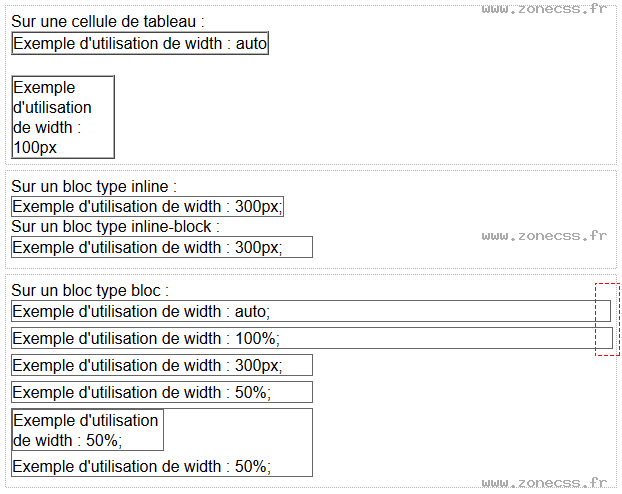
Interprétation du code de la propriété width CSS par votre navigateur.
Sur une cellule de tableau :
| Exemple d'utilisation de width : auto |
| Exemple d'utilisation de width : 100px |
Sur un bloc type inline :
Exemple d'utilisation de width : 300px;
Sur un bloc type inline-block :
Exemple d'utilisation de width : 300px;
Sur un bloc type bloc :
Exemple d'utilisation de width : auto;
Exemple d'utilisation de width : 100%;
Exemple d'utilisation de width : 300px;
Exemple d'utilisation de width : 50%;
Exemple d'utilisation de width : 50%;
Exemple d'utilisation de width : 50%;
Interprétation normale du code de la propriété CSS width (copie d'écran).